Repetition in R
- Computers are great at doing things repeatedly
- We’ve learned to use functions to find mass for one volume
est_mass <- function(volume){
  mass <- 2.65 * volume^0.9
  return(mass)
}

est_mass(1.6)
- This makes it easier to find mass for other volumes
est_mass(5.6)
est_mass(3.1)
- But, this is tedious, error-prone, and impossible for large numbers of volumes
- There are multiple ways to do something repeatedly in R and we’ll talk about all of them over the next several lessons
- These include
- Vectorize - where we right functions that take a vector of values, do elementwise calculations, and return a vector of results
- Using Map - which takes a function and runs it on each item in a list of items
- Combining our own functions with dplyr - which we can do using both vectorized and non-vectorized functions
- Loops - which provide us with complete control to perform of any kind of repetition we want
Vectorize
- Write functions that take a vector of values, do elementwise calculations, and return a vector of the results
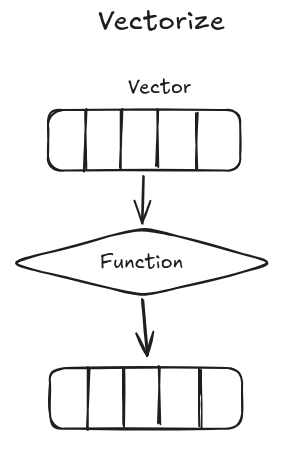
- Any function that only uses calculations that are vectorized
- E.g., vector math
c(1, 2, 3) * 2
- Our current function already works on a vector
est_mass <- function(volume){
  mass <- 2.65 * volume ^ 0.9
  return(mass)
}

volumes = c(1.6, 5.6, 3.1)
est_mass(volumes)
- Many functions in R are vectorized which means that we can often repeated things using only this vectorization
- We can also use vectorized functions with data frames by sending the individual columns of a data frame to the function
data <- data.frame(volumes, plant_id = c(1, 2, 3))
data
est_mass(data$volumes)
est_mass(data[['volumes']])
Multiple Arguments
- Let’s modify our function to take the coefficient (the value that is currently set as 2.65) as an argument
- We’ll call it
a
est_mass_coef <- function(volume, a){
  mass <- a * volume ^ 0.9
  return(mass)
}

est_mass_coef(volumes, 2.56)
- Because we only provided a single value of
a, that value gets used for every value ofvolumewhen doing the calculation - But multiplication is also vectorized for two vectors
c(1, 2, 3) * c(1, 2, 3)
- So we can also pass the function a vector of values for
a
as <- c(2.56, 1, 3.2)
est_mass_coef(volumes, as)
Integrating with dplyr
- We can also integrate our vectorized functions with
dplyr - This lets us use them to repeat calculations for each row in a data frame
- Let’s convert our
volumeandasvectors into a data frame
plant_data = data.frame(volume = volumes, a = as)
- To apply vectorized functions to each row in a table we can use
mutate
plant_data |>
  mutate(masses = est_mass_coef(volume, a))
- This is just like we’ve seen using other R functions, but it works with the vectorized functions we write as well
Map functions
- Not all functions in R are vectorized
- So we need a way to repeatedly run these non-vectorized functions
- The tidyverse way to do this is with the
mapfamily of functions from thepurrrpackage
library(purrr)
- These functions take two arguments
- The first is a vector of values that we want to run a function on
- The second is the function that we want to run on each value in the vector
mapfunctions run the function on each item in the vector-
Doesn’t require calculations to work on vectors
- Let’s look at this with a version of our function that only calculates mass for volumes less than a maximum size
est_mass_max <- function(volume){
  if (volume < 5) {
    mass <- 2.56 * volume ^ 0.9
  } else {
    mass <- NA
  }
  return(mass)
}
- If we try to run this function on our volume it won’t work because the
ifstatements are designed for a single value, not a vector
est_mass_max(volumes)
- Instead we can use one of the
map()functions - Map functions take the values from the vector one at a time and run then through a function
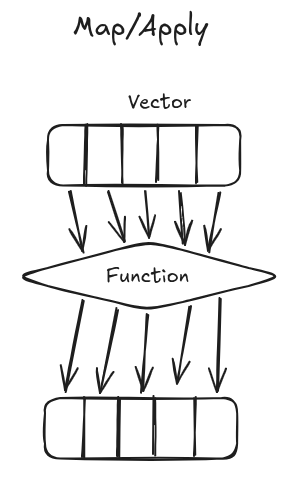
map_dbl & map
- We’ll start with
map_dbl() - This function take two arguments
- The first is a single vector
- The second is the function that we want to run on each element of that vector (or list)
- So if we use our
volumesvector and our newest_mass_max()function map_dbl()will run theest_mass_maxfunction on each value involumes, one value at a time
map_dbl(volumes, est_mass_max)
- Under the surface this is that same as running our
est_mass_max()function on the first item involumes - Then running it on the second value in
volumesand then the third value involumes - And the storing those values together in a vector
c(est_mass_max(volumes[1]), est_mass_max(volumes[2]), est_mass_max(volumes[3]))
-
This lets us do the same action on many things with single line of code
- Handful of similar functions in the
map()family - Differ depending on the type of output
- The
dblinmap_dblstands for “double”, which is how R stores decimal numbers - So
map_dblreturns a numeric vector - If our function returned character strings we would use
map_chrand if it returnedTRUEorFALSEwe would usemap_lgl mapwithout a type specification returns a “list”
map(volumes, est_mass_max)
- This is a more complicated, but also more flexible, data structure that we don’t see much in this class, but it’s useful to know the difference between
mapandmap_dbl. - We can store anything in a list, so if you had a function that made a bunch of graphs or a bunch of data frames
mapwould let you work with them - Likewise all of these functions can also take a list as input allowing you to accomplish more complicated things
Map with multiple arguments
map2()for functions with two arguments- Vegetation type specific equations
est_mass_type <- function(veg_type, volume){
  if (veg_type == "shrub"){
    mass <- 2.65 * volume^0.9
  } else {
    mass <- NA
  }
  return(mass)
}

est_mass_type("shrub", 1.6)
plant_types = c("shrub", "tree", "shrub")
est_mass_type(plant_types, volumes) # Error
- Doesn’t vectorize, due to conditionals
- Use a
mapfunction instead map2_dbl()because there are 2 inputs and a numeric output
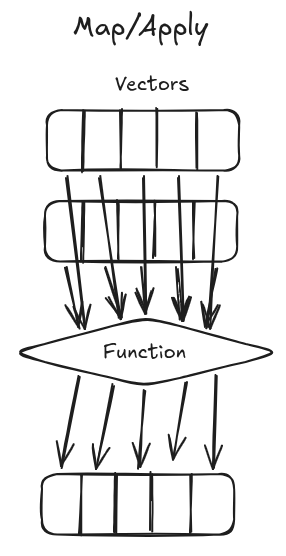
map2_dbl(plant_types, volumes, est_mass_type)
- First argument is the vector of values for the first argument of the function
- Second argument is the vector of values for the second argument of the function
-
Third argument is the function
- For functions with more than two arguments use
pmap() - Put the vectors in a
list()in the same order as the function’s arguments - This works for any number of arguments, so we can also use it for our two argument function
pmap_dbl(list(plant_types, volumes), est_mass_type)
Do Task 1 in Size Estimates By Name Apply.
Integrating with dplyr
- Let’s update our
plant_datadata frame to include our plant types
plant_type_data = data.frame(volume = volumes,
                        plant_type = plant_types)
- The basic integration with dplyr we used for vectorized functions won’t work with non-vectorized functions
plant_type_data |>
  mutate(masses = est_mass_type(plant_type, volume))
- Error because
est_mass_typeisn’t vectorized - By default
dplyrruns this function by converting the individual columns to vectors and running the function on those vectors - Just like when we tried to run the function on the vectors
- To get around this we add the function
rowwiseto ourdplyrpipeline - This tells
dplyrto work with the data one row at a time, like amapfunction
plant_type_data |>
  rowwise() |>
  mutate(masses = est_mass_type(plant_type, volume))
Do Task 2 in Size Estimates By Name Apply.
One result per group
- We can also combine functions with
group_byandsummarizeto repeat a calculation for each group - These functions need to take a vector as input and return a single value as output
- So, let’s write a function that calculates the biomass (the sum of the individual masses) for each plant type
get_biomass <- function(volumes){
  masses <- est_mass(volumes)
  biomass <- sum(masses)
  return(biomass)
}
- This function takes a vector of volumes as input and returns a single value, the biomass
- We can then group our data by
plant_type - And summarize by our function to calculate the biomass for each group
plant_type_data |>
  group_by(plant_type) |>
  summarize(biomass = get_biomass(volume))
Using map with files and data frames (optional)
map()will always return a list- We can store anything we want in a list
- Let’s download some (made up) satellite collar data where the data for each collar is stored in one file
download.file("https://www.datacarpentry.org/semester-biology/data/locations.zip",
              "locations.zip")
unzip("locations.zip")
data_files = list.files(pattern = "locations-")
- Since we can store anything in a list we can store entire data frames
- Use
map()to load all of the files into data frames
library(readr)

data_frames = map(data_files, read_csv)
- We ran the
read_csv()function on each data file - And get back a list of data frames
- Now we can use
map()again to do something to each data frame
library(dplyr)

get_unique_locations <- function(df){
  unique_locations <- df |>
    select(lat, long) |>
    distinct()
  return(unique_locations)
}

unique_locations <- map(data_frames, get_unique_locations)
- If we want to combine a list of data frames into a single data frame we can use
list_rbind()
list_rbind(unique_locations)
Mapping over columns (optional)
- A data frame is a list of columns
- So if we give a data frame to a
mapfunction it will run the function on each column
counts = data.frame(sp1 = c(5, 4, 7, 6), sp2 = c(6, 2, 6, 9), sp3 = c(8, 16, 1, 0))
counts
map_dbl(counts, sum)